

A free TeamSnap alternative
Battleplan gives every team its chat, schedule and RSVPs, polls, dues tracking, documents, and a coach's whiteboard, free, with no ads and no paid tier.

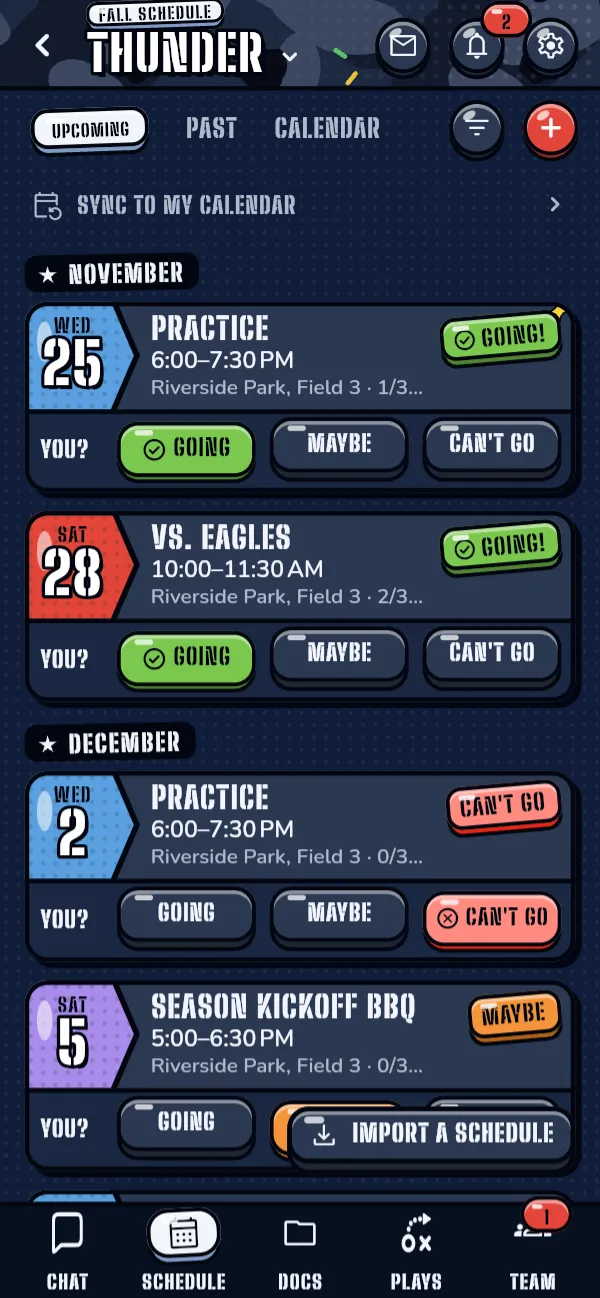
What every team gets.
Every feature, for every team, with no ads, no paid tier, and 200 MB of photos and files.
-
Team chat
Photos, replies, reactions, @mentions, announcements, and direct messages. See team chat.
-
Schedule and RSVPs
Games and practices, Going, Maybe, or Can't go for every player, reminders, and assignments. See the schedule.
-
Calendar sync
One private link keeps Google Calendar, Apple Calendar, or Outlook up to date.
-
Dues tracking
Who's paid, who owes what, and partial payments, with no fees. See dues.
-
Coach's whiteboard
Draw plays, press play, and post them to the chat. See the whiteboard.
-
Polls and documents
Settle questions in the chat, and keep the lineup, the rules, and the waivers one tap away.
Bring your TeamSnap team.
A team admin imports from TeamSnap in a few steps, and sees a preview of everything before it's added.
- Schedule: copy your team's calendar link from TeamSnap's Sync Calendar / Export.
- Players: export your roster from TeamSnap as a CSV file.
- Files: download the ones you want from TeamSnap's Media tab.
- In Battleplan, open Team settings (the gear at the top) → Import, choose TeamSnap, add the link and the files, check the preview, and tap Import.
Players come with their names, numbers, and birthdates; coaches and contact details stay behind, and guardians link themselves to their players. TeamSnap doesn't export its chat. See every step.
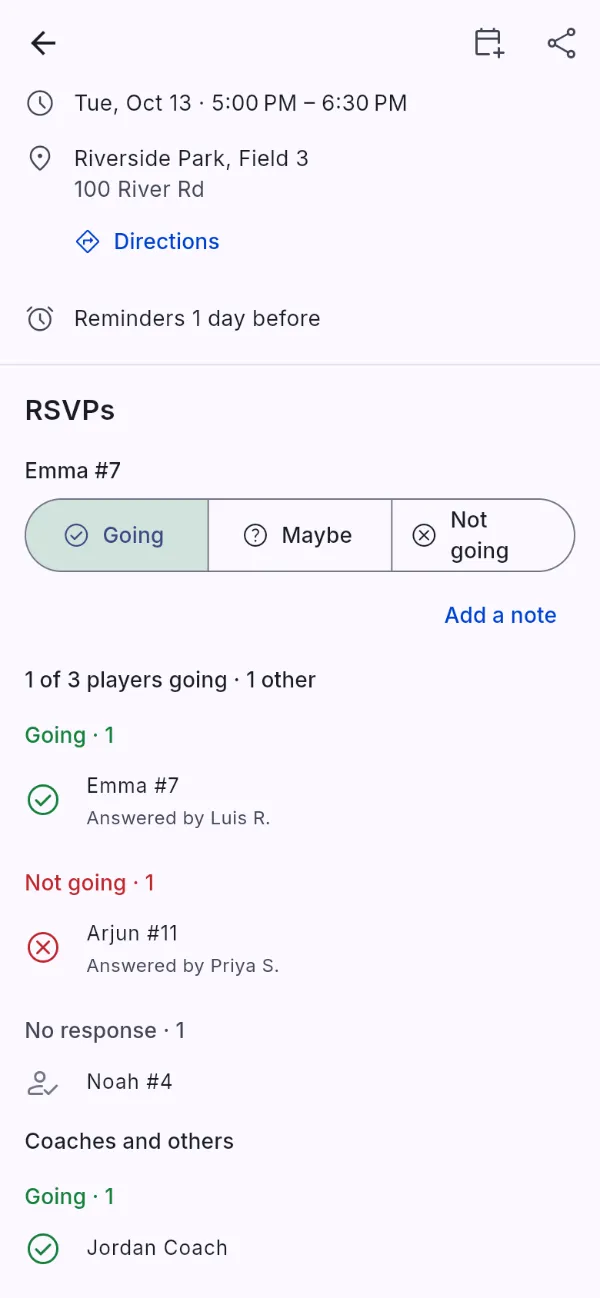
A row for each player.
Every player has their own Going, Maybe, and Can't go row, and guardians answer for each of their players. Counts are players only. Accounts are for adults; players who don't use the app are on the roster.
- A row for each player
- Counts are players only
- Accounts are for adults
What Battleplan doesn't do.
Battleplan is for running a team, not a league. It doesn't take payments or registrations, keep live scores or stats, or stream games. Dues are tracked, not collected: people pay the team directly with Venmo, Cash App, or Apple Cash. If your team needs those, keep the tool that does them, and use Battleplan for the chat, the schedule, and the plays.
Questions
Is Battleplan really free?
Yes. Every team gets every feature, with no ads and no paid tier. Each team has room for 200 MB of photos and files.
What comes over from TeamSnap?
Your schedule, from TeamSnap's calendar link; your players, with their names, numbers, and birthdates, from a roster export; and the files you download. Coaches, contact details, and the chat stay behind.
Does Battleplan handle payments or registration?
No. Battleplan tracks dues, but people pay the team directly with Venmo, Cash App, or Apple Cash. It has no registration forms.
Does it work on iPhone, Android, and computers?
The iPhone and iPad app is on the App Store, and Battleplan works in any modern browser on a phone or a computer. You sign in with Google or Apple. An Android app is on the way.
Can we use it with GameChanger?
Yes. Battleplan doesn't keep scores, but it imports a GameChanger schedule from its calendar link, with each game's opponent and home or away. Switch to Battleplan has the steps.
Take a closer look.
GroupMe, TeamSnap, TeamReach, and GameChanger are trademarks of their owners; Battleplan isn't affiliated with them.