
Baseball and softball whiteboard
Draw baseball and softball plays on the diamond, add steps, and press play. Post a play to the team chat or save it as a GIF. Free, with no ads.

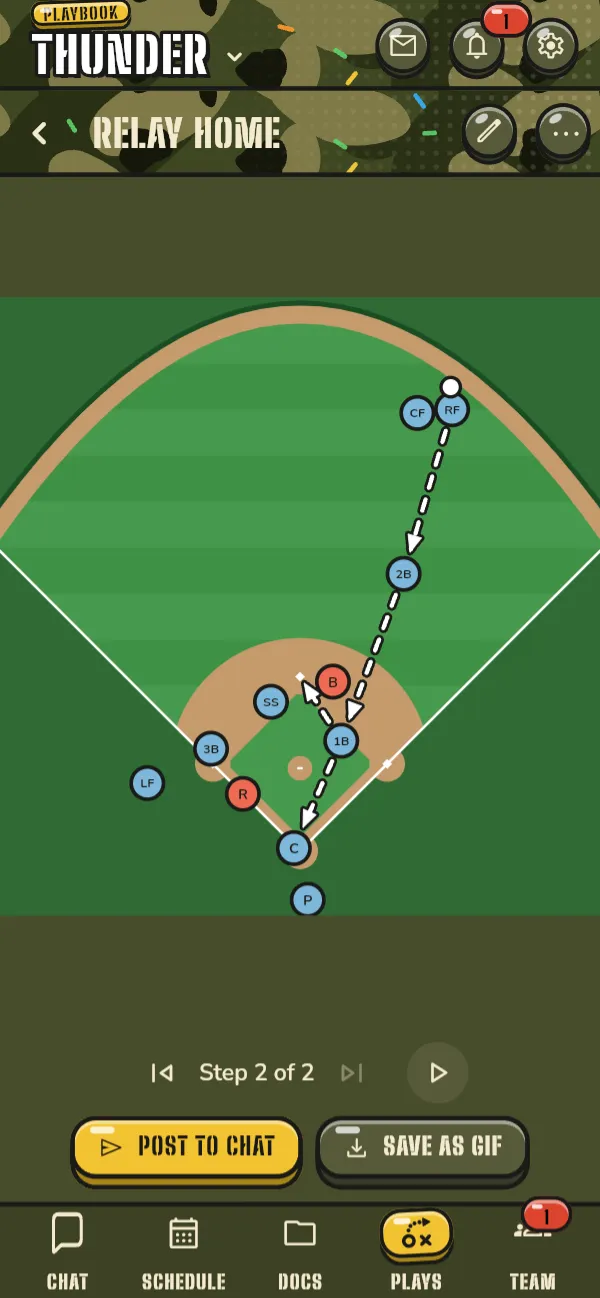
Draw a play in seconds.
Plays opens on a real baseball field, drawn to scale: the outfield grass, the warning track and fence, the infield, the bases, the mound, and room behind home plate for the pitcher backing up.
-
The nine, in place
Your players start at P, C, 1B, 2B, 3B, SS, LF, CF, and RF, and the ball starts in the pitcher's hand. The other side can start with a batter or with the bases loaded.
-
Drag and draw
Drag players and the ball with a finger, a stylus, or a mouse. Draw solid arrows for runs, dashed ones for throws, freehand lines, and text.
-
Label anyone
Label a player with a number, a position, or a name from your roster. Undo and redo as you go.
-
Nothing lost
The board keeps your drawing on that device until you clear it, so leaving never loses it. New board starts over.
Add steps, press play.
Show how a play unfolds, one step at a time, then watch it run.
-
Up to 10 steps
Each new step starts where everyone stands, so you move only who moves.
-
Press play
The players and the ball glide from one step to the next. Stop it anytime, or step through by hand.
-
iPad, iPhone, and web
Made for an iPad's touch at practice, and just as good with a mouse on a laptop. On an iPhone the board runs the screen's width.
The plays coaches draw.
Battleplan doesn't come with canned plays: you draw your own, the way your team runs them. Coaches use it for the plays that are hard to explain out loud:
- Relay home
- Cutoff to third
- Bunt coverage
- First-and-third defense
- Backing up bases
- Pickoffs
- Rundowns
Softball too.
A softball team's Plays opens on the same diamond, with the same nine, steps, and sharing, so softball coaches draw their bunt defenses and first-and-thirds the same way.
Other sports, other boards.
Every board is drawn from a real field's measurements, with its own starting positions. Any board can be picked.
-
Basketball
A half or full court with the lane and the three-point line. Your five at PG, SG, SF, PF, and C, and the other side in man-to-man or a 2-3 zone.
-
Soccer
A full or half pitch with its boxes and goals, in 4-4-2, 4-3-3, 3-5-2, 9v9, or 7v7.
-
Football
X's and O's on yard lines and hash marks: the offense in the I formation or shotgun, the defense in a 4-3 or 3-4.
-
Blank board
For every other sport: a clean board to draw on.
The rest of your team's day.
Plays is part of every team on Battleplan, next to the chat, the schedule, and the documents.
-
Team chat
Messages, photos, polls, and announcements in one place. See team chat.
-
Schedule and RSVPs
Games and practices with Going, Maybe, or Can't go for every player. See the schedule.
-
Team dues
Who's paid for uniforms and fees, and who owes what. See dues.
Questions
Is the baseball whiteboard free?
Yes. Plays and every other feature are free for every team, with no ads and no paid tier.
Does it work on an iPad and a computer?
Yes. Plays is made for an iPad's touch and works with a mouse in any modern browser. On an iPhone the board runs the screen's width, with the tools below it. An Android app is on the way.
Can I save a play as a GIF?
Yes. Save as GIF makes an animated GIF of a saved play: each step glides into the next, and the last one holds for 3 seconds before it starts over. On a phone it goes to your photos; in a browser it downloads, or opens the share sheet.
Does it work for softball?
Yes. Softball teams draw on the same diamond as baseball teams, with the same players, steps, and sharing.
Who can see our plays?
Only your team. Team admins draw and save plays, and everyone on the team can open them and play them back. Nobody outside the team can see them.
Do I need the rest of Battleplan to use it?
Plays is part of every team on Battleplan. Create a free team, and Plays is beside its chat, schedule, and documents.